
PydanticAI 架构设计
本章概览
本章将深入解析 PydanticAI 的整体架构设计,帮助你理解:
- 核心组件及其职责
- Agent 执行流程
- 类型系统设计
- 与 LangGraph 架构的对比
1. 整体架构
1.1 分层架构
PydanticAI 采用清晰的分层设计:
┌─────────────────────────────────────────────────────────────────┐
│                      Application Layer                           │
│                       (应用层)                                    │
│  ┌─────────────────────────────────────────────────────────┐    │
│  │                    User Code                             │    │
│  │              开发者编写的业务逻辑                          │    │
│  └─────────────────────────────────────────────────────────┘    │
└─────────────────────────────────────────────────────────────────┘
                              │
                              ▼
┌─────────────────────────────────────────────────────────────────┐
│                       Agent Layer                                │
│                       (Agent 层)                                 │
│  ┌──────────┐  ┌──────────┐  ┌──────────┐  ┌──────────────┐    │
│  │  Agent   │  │  Tools   │  │  Output  │  │ Dependencies │    │
│  │          │  │          │  │  Types   │  │              │    │
│  └──────────┘  └──────────┘  └──────────┘  └──────────────┘    │
└─────────────────────────────────────────────────────────────────┘
                              │
                              ▼
┌─────────────────────────────────────────────────────────────────┐
│                       Model Layer                                │
│                      (模型抽象层)                                 │
│  ┌──────────────────────────────────────────────────────────┐   │
│  │                    Model Interface                        │   │
│  │              统一的模型交互接口                             │   │
│  └──────────────────────────────────────────────────────────┘   │
└─────────────────────────────────────────────────────────────────┘
                              │
                              ▼
┌─────────────────────────────────────────────────────────────────┐
│                     Provider Layer                               │
│                    (提供商适配层)                                 │
│  ┌─────────┐  ┌─────────┐  ┌─────────┐  ┌─────────┐            │
│  │ OpenAI  │  │Anthropic│  │ Gemini  │  │ Ollama  │  ...       │
│  └─────────┘  └─────────┘  └─────────┘  └─────────┘            │
└─────────────────────────────────────────────────────────────────┘1.2 核心组件
| 组件 | 职责 | 类比 |
|---|---|---|
| Agent | 核心控制器,编排所有交互 | FastAPI 的 Router |
| Tools | LLM 可调用的函数 | FastAPI 的 Endpoints |
| Dependencies | 运行时注入的依赖 | FastAPI 的 Depends |
| Output Types | 结构化输出定义 | FastAPI 的 Response Models |
| Model | LLM 抽象接口 | 数据库 ORM |
| Provider | 具体 LLM 实现 | 数据库驱动 |
2. Agent 核心架构
2.1 Agent 类设计
Agent 是 PydanticAI 的核心类,它是一个泛型类:
python
class Agent(Generic[DepsT, OutputT]):
    """
    Agent[DepsT, OutputT]

    - DepsT: 依赖类型,通过 deps_type 参数指定
    - OutputT: 输出类型,通过 output_type 参数指定
    """

    def __init__(
        self,
        model: str | Model,                    # 模型标识或实例
        *,
        output_type: type[OutputT] = str,      # 输出类型
        deps_type: type[DepsT] = None,         # 依赖类型
        instructions: str = None,              # 系统指令
        tools: list[Tool] = None,              # 工具列表
        model_settings: ModelSettings = None,  # 模型配置
    ):
...2.2 Agent 内部结构
┌──────────────────────────────────────────────────────────────┐
│                         Agent                                 │
├──────────────────────────────────────────────────────────────┤
│                                                               │
│  ┌─────────────────────────────────────────────────────────┐ │
│  │                   Configuration                          │ │
│  │  • model: 使用的 LLM                                     │ │
│  │  • instructions: 系统指令                                │ │
│  │  • model_settings: 模型参数 (temperature, max_tokens)   │ │
│  └─────────────────────────────────────────────────────────┘ │
│                                                               │
│  ┌─────────────────────────────────────────────────────────┐ │
│  │                   Type Definitions                        │ │
│  │  • deps_type: 依赖类型定义                               │ │
│  │  • output_type: 输出类型定义                             │ │
│  └─────────────────────────────────────────────────────────┘ │
│                                                               │
│  ┌─────────────────────────────────────────────────────────┐ │
│  │                   Registered Tools                        │ │
│  │  • @agent.tool 装饰的函数                                │ │
│  │  • @agent.tool_plain 装饰的函数                          │ │
│  │  • 构造函数传入的 tools                                  │ │
│  └─────────────────────────────────────────────────────────┘ │
│                                                               │
│  ┌─────────────────────────────────────────────────────────┐ │
│  │                   Registered Prompts                      │ │
│  │  • @agent.system_prompt 装饰的函数                       │ │
│  │  • @agent.instructions 装饰的函数                        │ │
│  └─────────────────────────────────────────────────────────┘ │
│                                                               │
└──────────────────────────────────────────────────────────────┘2.3 Agent 执行方法
Agent 提供多种执行方式:
python
# 1. 异步执行
result = await agent.run('prompt', deps=my_deps)

# 2. 同步执行(内部使用事件循环)
result = agent.run_sync('prompt', deps=my_deps)

# 3. 流式输出
async with agent.run_stream('prompt', deps=my_deps) as stream:
    async for chunk in stream.stream_text():
        print(chunk, end='')

# 4. 流式事件
async with agent.run_stream_events('prompt', deps=my_deps) as stream:
    async for event in stream:
        print(event)

# 5. 迭代控制(高级)
async with agent.iter('prompt', deps=my_deps) as run:
    async for node in run:
        # 手动控制每个节点
pass3. 执行流程
3.1 基本执行流程
 图:PydanticAI Agents 官方文档页面
┌─────────────────────────────────────────────────────────────────┐
│                      Agent.run() 执行流程                        │
└─────────────────────────────────────────────────────────────────┘

用户调用
    │
    ▼
┌─────────────────────────────────────────┐
│           1. 准备阶段                    │
│  • 解析依赖 (deps)                       │
│  • 构建系统提示 (instructions)           │
│  • 收集所有工具定义                      │
└───────────────────┬─────────────────────┘
                    │
                    ▼
┌─────────────────────────────────────────┐
│           2. 请求阶段                    │
│  • 构建消息列表 (messages)               │
│  • 发送请求到 LLM                        │
│  • 处理流式/非流式响应                   │
└───────────────────┬─────────────────────┘
                    │
                    ▼
              ┌─────────────┐
              │ LLM 响应    │
              └──────┬──────┘
                     │
         ┌───────────┴───────────┐
         ▼                       ▼
┌─────────────────┐      ┌─────────────────┐
│  纯文本响应      │      │  工具调用请求    │
└────────┬────────┘      └────────┬────────┘
         │                        │
         │                        ▼
         │               ┌─────────────────┐
         │               │  3. 工具执行     │
         │               │  • 解析参数      │
         │               │  • 验证参数      │
         │               │  • 执行工具      │
         │               │  • 收集结果      │
         │               └────────┬────────┘
         │                        │
         │                        ▼
         │               ┌─────────────────┐
         │               │  发送工具结果    │
         │               │  到 LLM          │
         │               └────────┬────────┘
         │                        │
         │                        └─────────┐
         │                                  │
         │                          循环直到无工具调用
         │                                  │
         └───────────────┬──────────────────┘
                         │
                         ▼
┌─────────────────────────────────────────┐
│           4. 输出验证阶段                │
│  • 解析 LLM 最终响应                     │
│  • Pydantic 验证输出类型                 │
│  • 验证失败则触发重试                    │
└───────────────────┬─────────────────────┘
                    │
                    ▼
┌─────────────────────────────────────────┐
│           5. 返回结果                    │
│  • 包装为 RunResult / StreamedRunResult │
│  • 包含输出、消息历史、使用统计          │
└─────────────────────────────────────────┘3.2 内部节点模型
PydanticAI 使用 pydantic-graph 管理执行状态:
python
# 内部节点类型
class UserPromptNode:
    """用户输入节点"""
    pass

class ModelRequestNode:
    """模型请求节点"""
    pass

class CallToolsNode:
    """工具调用节点"""
    pass

class End:
    """结束节点,包含最终结果"""
pass执行图示意:
UserPromptNode ──► ModelRequestNode ──► CallToolsNode ──► ModelRequestNode ──► End
                        │                     ▲                  │
                        │                     │                  │
                        └── 有工具调用 ────────┘                  │
                                                                 │
└──────────── 无工具调用 ─────────────────┘4. 类型系统
4.1 泛型设计
PydanticAI 大量使用 Python 泛型确保类型安全:
python
from typing import Generic, TypeVar
from pydantic import BaseModel

# 类型变量
DepsT = TypeVar('DepsT')    # 依赖类型
OutputT = TypeVar('OutputT') # 输出类型

# Agent 是双参数泛型
class Agent(Generic[DepsT, OutputT]):
    ...

# RunContext 是单参数泛型
class RunContext(Generic[DepsT]):
    deps: DepsT  # 类型安全的依赖访问
    ...

# 使用示例
from dataclasses import dataclass

@dataclass
class MyDeps:
    api_key: str
    user_id: int

class MyOutput(BaseModel):
    answer: str
    confidence: float

# 完整类型注解
agent: Agent[MyDeps, MyOutput] = Agent(
    'openai:gpt-4o',
    deps_type=MyDeps,
    output_type=MyOutput,
)4.2 输出类型支持
PydanticAI 支持多种输出类型:
python
# 1. 简单类型
agent = Agent('openai:gpt-4o', output_type=str)
agent = Agent('openai:gpt-4o', output_type=int)
agent = Agent('openai:gpt-4o', output_type=bool)

# 2. Pydantic 模型
class UserInfo(BaseModel):
    name: str
    age: int

agent = Agent('openai:gpt-4o', output_type=UserInfo)

# 3. 列表类型
agent = Agent('openai:gpt-4o', output_type=list[str])

# 4. 联合类型
from typing import Union

class Success(BaseModel):
    result: str

class Failure(BaseModel):
    error: str

agent = Agent('openai:gpt-4o', output_type=Union[Success, Failure])

# 5. TypedDict
from typing import TypedDict

class Config(TypedDict):
    host: str
    port: int

agent = Agent('openai:gpt-4o', output_type=Config)4.3 输出模式
PydanticAI 提供三种输出实现方式:
┌─────────────────────────────────────────────────────────────────┐
│                       输出模式对比                               │
├─────────────────────────────────────────────────────────────────┤
│                                                                  │
│  Tool Output (默认)                                              │
│  ─────────────────                                               │
│  • 使用工具调用返回结构化数据                                     │
│  • 几乎所有模型都支持                                            │
│  • 最可靠的方式                                                  │
│                                                                  │
│  Native Output                                                   │
│  ─────────────                                                   │
│  • 使用模型原生 "Structured Outputs" 功能                        │
│  • 仅部分模型支持 (OpenAI, Gemini)                               │
│  • 性能最好                                                      │
│                                                                  │
│  Prompted Output                                                 │
│  ───────────────                                                 │
│  • 将 JSON Schema 注入提示词                                     │
│  • 所有模型都支持                                                │
│  • 可靠性较低                                                    │
│                                                                  │
└─────────────────────────────────────────────────────────────────┘5. 模型抽象
5.1 模型标识符
PydanticAI 使用简洁的字符串格式标识模型:
格式: provider:model_name

示例:
  openai:gpt-4o
  anthropic:claude-sonnet-4-0
  google-gla:gemini-1.5-pro
  ollama:llama3.2
bedrock:us.anthropic.claude-3-5-sonnet-20241022-v2:0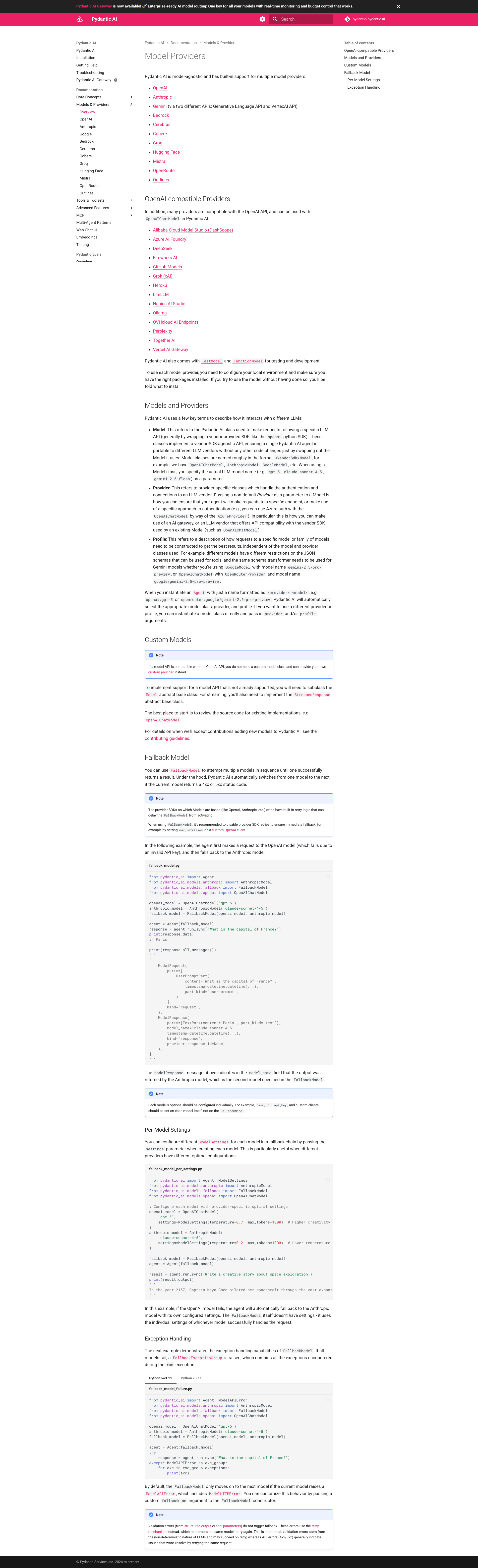 图:PydanticAI 支持的模型提供商
5.2 模型层次结构
                    ┌─────────────────┐
                    │     Model       │
                    │   (抽象基类)     │
                    └────────┬────────┘
                             │
        ┌────────────────────┼────────────────────┐
        │                    │                    │
        ▼                    ▼                    ▼
┌───────────────┐   ┌───────────────┐   ┌───────────────┐
│  OpenAIModel  │   │AnthropicModel │   │  GeminiModel  │
└───────────────┘   └───────────────┘   └───────────────┘
        │                    │                    │
        ▼                    ▼                    ▼
┌───────────────┐   ┌───────────────┐   ┌───────────────┐
│   Provider    │   │   Provider    │   │   Provider    │
│  (API 客户端)  │   │  (API 客户端)  │   │  (API 客户端)  │
└───────────────┘ └───────────────┘ └───────────────┘5.3 回退模型
支持多模型回退机制:
python
from pydantic_ai import Agent
from pydantic_ai.models import FallbackModel

# 创建回退模型
fallback = FallbackModel(
    'anthropic:claude-sonnet-4-0',  # 主模型
    'openai:gpt-4o',                 # 备用模型 1
    'google-gla:gemini-1.5-pro',     # 备用模型 2
)

agent = Agent(fallback)

# 如果主模型失败 (4xx/5xx),自动尝试下一个
result = agent.run_sync('Hello')6. 工具系统
6.1 工具注册方式
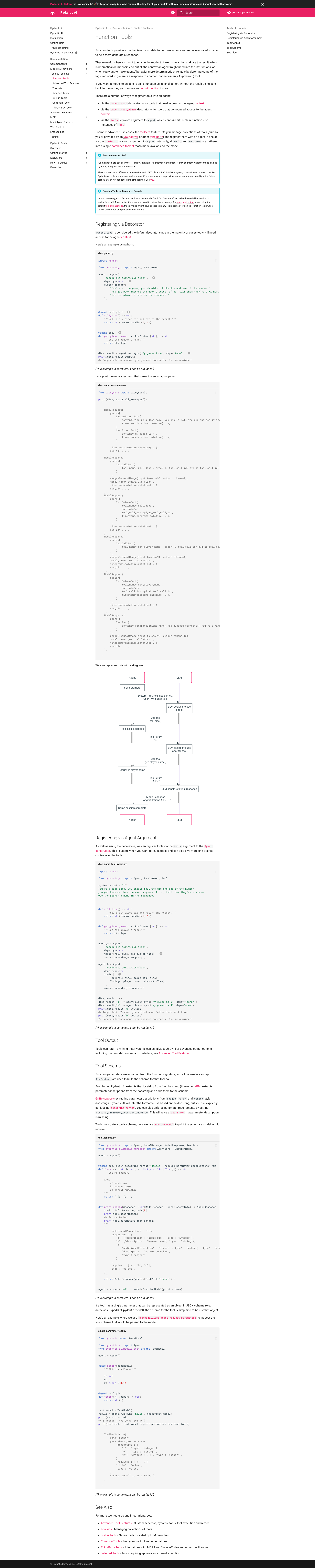 图:PydanticAI Tools 官方文档
python
from pydantic_ai import Agent, RunContext

agent = Agent('openai:gpt-4o', deps_type=str)

# 方式 1: @agent.tool - 需要访问上下文
@agent.tool
async def get_user_name(ctx: RunContext[str]) -> str:
    """获取用户名称"""
    return ctx.deps

# 方式 2: @agent.tool_plain - 不需要上下文
@agent.tool_plain
def calculate(a: int, b: int) -> int:
    """计算两数之和"""
    return a + b

# 方式 3: 构造函数传入
from pydantic_ai import Tool

def my_tool(x: str) -> str:
    """我的工具"""
    return x.upper()

agent = Agent(
    'openai:gpt-4o',
    tools=[Tool(my_tool)]
)6.2 工具 Schema 生成
PydanticAI 自动从函数签名生成工具 Schema:
python
@agent.tool_plain
def search_database(
    query: str,           # 必需参数
    limit: int = 10,      # 可选参数,默认 10
    include_deleted: bool = False,  # 可选参数,默认 False
) -> list[dict]:
    """
    搜索数据库记录

    Args:
        query: 搜索关键词
        limit: 返回结果数量限制
        include_deleted: 是否包含已删除记录
    """
...自动生成的 Schema:
json
{
    "name": "search_database",
    "description": "搜索数据库记录",
    "parameters": {
        "type": "object",
        "properties": {
            "query": {
                "type": "string",
                "description": "搜索关键词"
            },
            "limit": {
                "type": "integer",
                "description": "返回结果数量限制",
                "default": 10
            },
            "include_deleted": {
                "type": "boolean",
                "description": "是否包含已删除记录",
                "default": false
            }
        },
        "required": ["query"]
    }
}7. 依赖注入
7.1 依赖系统设计
┌─────────────────────────────────────────────────────────────────┐
│                      依赖注入流程                                │
└─────────────────────────────────────────────────────────────────┘

1. 定义依赖类型
   │
   ▼
┌─────────────────────────────────────────┐
│  @dataclass                              │
│  class MyDeps:                           │
│      db: Database                        │
│      api: APIClient                      │
│      user_id: int                        │
└───────────────────┬─────────────────────┘
                    │
                    ▼
2. 创建 Agent 时声明
   │
   ▼
┌─────────────────────────────────────────┐
│  agent = Agent(                          │
│      'openai:gpt-4o',                    │
│      deps_type=MyDeps,  ◄── 声明类型     │
│  )                                       │
└───────────────────┬─────────────────────┘
                    │
                    ▼
3. 工具中通过 RunContext 访问
   │
   ▼
┌─────────────────────────────────────────┐
│  @agent.tool                             │
│  async def my_tool(                      │
│      ctx: RunContext[MyDeps]  ◄── 类型化 │
│  ) -> str:                               │
│      user = ctx.deps.db.get_user(        │
│          ctx.deps.user_id                │
│      )                                   │
│      return user.name                    │
└───────────────────┬─────────────────────┘
                    │
                    ▼
4. 运行时传入依赖实例
   │
   ▼
┌─────────────────────────────────────────┐
│  result = agent.run_sync(                │
│      'prompt',                           │
│      deps=MyDeps(                        │
│          db=my_db,  ◄── 实例注入         │
│          api=my_api,                     │
│          user_id=123,                    │
│      )                                   │
│  )                                       │
└─────────────────────────────────────────┘7.2 RunContext 详解
python
from pydantic_ai import RunContext

class RunContext(Generic[DepsT]):
    """运行时上下文"""

    # 依赖实例
    deps: DepsT

    # 当前使用的模型
    model: Model

    # Token 使用统计
    usage: Usage

    # 消息历史
    messages: list[Message]

    # 工具名称(仅在工具执行时可用)
    tool_name: str | None

    # 重试次数
retry: int8. 与 LangGraph 架构对比
8.1 设计哲学对比
┌─────────────────────────────────────────────────────────────────┐
│                      架构设计对比                                │
├─────────────────────────────────────────────────────────────────┤
│                                                                  │
│  PydanticAI                          LangGraph                   │
│  ─────────                           ─────────                   │
│                                                                  │
│  声明式                               图式                       │
│  Declarative                         Graph-based                │
│                                                                  │
│  ┌─────────────────┐                ┌─────────────────┐         │
│  │     Agent       │                │     Graph       │         │
│  │       │         │                │       │         │         │
│  │   ┌───┴───┐     │                │  ┌────┼────┐    │         │
│  │   │ Tools │     │                │  │ Nodes   │    │         │
│  │   └───────┘     │                │  │    ↓    │    │         │
│  │                 │                │  │  Edges  │    │         │
│  └─────────────────┘                │  └─────────┘    │         │
│                                      └─────────────────┘         │
│  隐式控制流                          显式控制流                   │
│  (框架管理)                          (开发者定义)                 │
│                                                                  │
└─────────────────────────────────────────────────────────────────┘8.2 组件映射
| PydanticAI 概念 | LangGraph 对应概念 |
|---|---|
| Agent | StateGraph |
| Tool | Node (tool node) |
| RunContext | State |
| output_type | State schema |
| @agent.tool | @tool decorator |
| run() | graph.invoke() |
| run_stream() | graph.stream() |
8.3 适用场景
PydanticAI 更适合:
─────────────────
✓ 快速原型开发
✓ 简单的单 Agent 应用
✓ 强调类型安全的项目
✓ 需要结构化输出的场景
✓ FastAPI 项目集成

LangGraph 更适合:
─────────────────
✓ 复杂的多 Agent 协作
✓ 需要精确控制执行流程
✓ 有复杂状态管理需求
✓ 需要人类介入的工作流
✓ 企业级应用编排9. 小结
PydanticAI 的架构设计体现了以下核心原则:
- 类型优先:从底层到顶层全面使用 Python 类型系统
- 简洁 API:隐藏复杂性,暴露简单接口
- 可组合:工具、依赖、输出类型可自由组合
- 可观测:内置追踪和调试支持
- 灵活性:多种执行方式满足不同需求
与 LangGraph 相比,PydanticAI 选择了不同的权衡:
- 牺牲部分控制粒度,换取更简单的 API
- 牺牲部分灵活性,换取更强的类型安全
- 隐式执行流程,换取更快的开发速度
在下一章中,我们将深入探讨 PydanticAI 的核心概念:Agent、Tools、Dependencies 的详细使用方法。